MST0052
## MST0052 — Lecture 2 ### AI Tools in a Machine-Learning Workflow Fall 2026 --- <!-- Section A — Opening --> ## Where we are L1 set up the course. Today is about **how** you'll work for the rest of the semester. | Lectures | Phase | |----------|-------| | **1–3** | **Foundations — you are here** | | 4–7 | Core methods | | 8–13 | Going further | | 14–16 | Wrapping up | --- ## Today's plan - Where AI tools genuinely help in an ML workflow - Where they **fail silently** - **Live demo:** Claude Code on a real ML task - **Live demo:** scikit-learn pipeline from scratch - How to document AI use in your project --- <!-- Section B — Why this lecture exists --> ## The state of AI tools in 2026 - AI coding assistants are part of the default toolchain - Pretending otherwise is dishonest - This course's stance: **allowed, encouraged**, with one hard constraint > Everything you submit, you must be able to defend at the oral exam. --- ## Why naive use is dangerous in ML - AI is good at **code** - ML is partly code and partly **statistical reasoning** - The dangerous failures live in the reasoning layer, not the syntax layer That's why this course spends a whole lecture on it. --- ## What I'll ask you to do differently - Use AI for what it's good at — don't outsource thinking - **Verify** everything you can't explain - **Document** what you used and how --- <!-- Section C — Where AI tools help --> ## Mental model: junior collaborator Treat the AI like a **fast, well-read junior** who has never seen your data.  --- ## Where AI tools help - **Boilerplate and scaffolding** — project skeletons, `requirements.txt`, pipeline scaffolds - **Debugging** — paste a traceback + code, get diagnostic suggestions - **Explaining unfamiliar code** — "What does `StratifiedKFold` do?" - **Drafting prose** — rough drafts, tightening paragraphs - **Learning new methods** — go beyond the syllabus, then verify --- ## Explaining unfamiliar code Good questions to ask an AI: - "Explain what `StratifiedKFold` does and when I'd use it." - "What does `class_weight='balanced'` change in logistic regression?" - "What is the difference between `fit_transform` and `transform`?" A faster route to documentation — **when you verify against the real docs.** --- ## Learning beyond the syllabus - Want to try gradient boosting with monotonic constraints? Ask, read, try it. - AI lets you go further than you could on your own - **But:** the oral exam will still ask what it does and why you used it --- <!-- Section D — Where AI tools fail silently --> ## The category that matters most 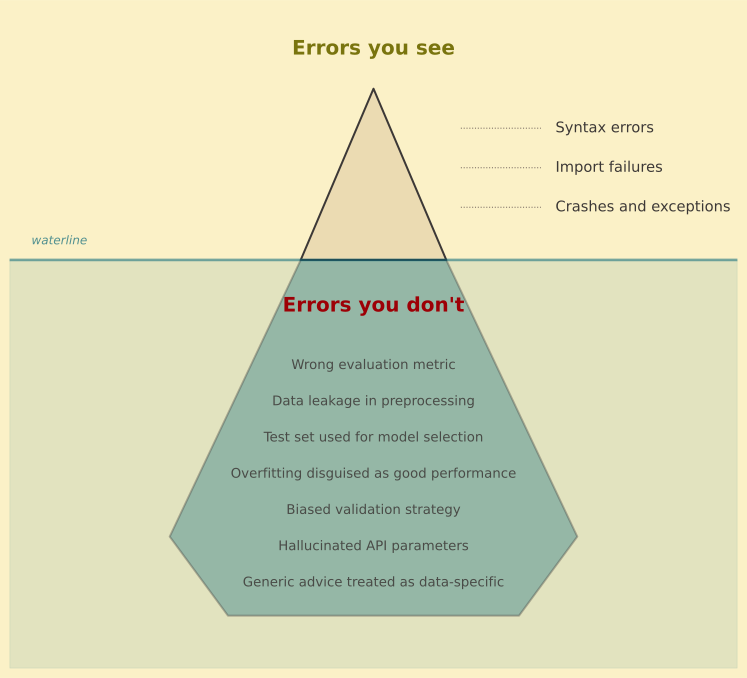 --- ## Failure 1: statistical reasoning AI will happily write code that: - Picks the "best" model without correcting for multiple comparisons - Reports test-set accuracy after using the test set to pick a hyperparameter - Uses RMSE on highly skewed targets without comment Each piece of code is **syntactically correct** and **statistically wrong.** --- ## Failure 2: data-specific judgment AI doesn't know your data. - It assumes i.i.d. when your data is temporal - It assumes the target is what you say it is - It will not notice that `customer_lifetime_value` was computed using future information --- ## The cross-validation leakage pattern **Wrong:** ```python scaler = StandardScaler() X_scaled = scaler.fit_transform(X) # leakage! scores = cross_val_score(model, X_scaled, y, cv=5) ``` **Right:** ```python pipe = make_pipeline(StandardScaler(), LogisticRegression()) scores = cross_val_score(pipe, X, y, cv=5) ``` The scaler in the first version sees the **entire dataset** — including the validation fold. --- ## Failure 3: confidently wrong references - Made-up function arguments - Plausible-looking but non-existent sklearn methods - Hallucinated paper citations Less common in 2026 than in 2023, but not gone. **Always verify against real documentation.** --- ## Red flags you should never ignore - The model accuracy that looks **too good** - The CV score that matches the test score to three decimals - The result that contradicts a sanity check - The code you **can't explain** line-by-line --- <!-- Section E — The terminal and live demos --> ## Why the terminal matters - The terminal is where you **run code**, manage files, and control your environment - No hidden state — every command is explicit and reproducible - Scripts you run in the terminal can be versioned, shared, and re-run - Most professional ML work happens here, not in GUIs If you're not comfortable in the terminal yet — this course will get you there. --- ## The terminal as an LLM interface - Terminal-based AI tools (Claude Code, Codex CLI, Gemini CLI) give you **more control** than chat apps built on top of LLMs - The agent can see your files, run your code, and iterate — all in your actual project - No copy-pasting between a chat window and your editor - You decide what the agent can read, write, and execute > The closer the AI is to your actual workflow, the more useful it becomes. --- ## Demo time: Claude Code **What it is:** an AI agent that runs in the terminal — reads your files, writes code, runs commands. **What we'll do:** 1. Start a small ML project from scratch 2. Ask Claude Code to explore the data 3. Build a scikit-learn pipeline 4. Check whether it gets the validation right --- ## What just happened - Claude Code was fast at **scaffolding**, **boilerplate**, and **running things** - But you still needed to check: - Was the pipeline correct? - Did the validation strategy make sense? - Would you trust those numbers? The tool accelerated the work. **The judgment was still yours.** --- <!-- Section F — Live demo: scikit-learn --> ## The scikit-learn workflow  --- ## Step 1: Load and split ```python import pandas as pd from sklearn.model_selection import train_test_split df = pd.read_csv("penguins.csv").dropna() X = df.drop(columns=["species"]) y = df["species"] X_train, X_test, y_train, y_test = train_test_split( X, y, test_size=0.2, random_state=42, stratify=y ) ``` - `stratify=y` — preserves class balance in both splits - `random_state=42` — reproducibility --- ## Step 2: Build a pipeline ```python from sklearn.pipeline import make_pipeline from sklearn.preprocessing import StandardScaler, OneHotEncoder from sklearn.compose import make_column_transformer from sklearn.linear_model import LogisticRegression num_cols = ["bill_length_mm", "bill_depth_mm", "flipper_length_mm", "body_mass_g"] cat_cols = ["island", "sex"] preprocess = make_column_transformer( (StandardScaler(), num_cols), (OneHotEncoder(), cat_cols), ) pipe = make_pipeline(preprocess, LogisticRegression()) ``` --- ## Step 3: Fit, predict, evaluate ```python from sklearn.metrics import classification_report pipe.fit(X_train, y_train) y_pred = pipe.predict(X_test) print(classification_report(y_test, y_pred)) ``` --- ## Step 4: Cross-validation ```python from sklearn.model_selection import cross_val_score scores = cross_val_score(pipe, X_train, y_train, cv=5, scoring="accuracy") print(f"CV accuracy: {scores.mean():.3f} ± {scores.std():.3f}") ``` - We cross-validate on the **training set** - The test set stays untouched until the very end - This is the correct pattern from the leakage slide --- ## What you just saw - The five-step pattern: **load → split → pipeline → fit → evaluate** - Preprocessing inside the pipeline prevents leakage - Cross-validation on training data; test set held out until the end - You will use this exact pattern in your project --- <!-- Section G — How to prompt and verify --> ## A weak prompt vs a strong prompt **Weak:** > "Help me classify this data." **Strong:** > "I have a binary churn target on 12k rows of tabular data with 30 mixed-type features. I want a baseline logistic regression with preprocessing inside a sklearn pipeline, evaluated with 5-fold stratified CV, reporting ROC-AUC ± std." The strong prompt is the question you'd ask a thoughtful colleague. --- ## Verification habits - **Run the code.** Don't just read it. - **Check shapes, ranges, NaNs** after every step - For statistical claims, ask: *"What would I see if this were wrong?"* - Cross-check with the **official docs** — 5 seconds of verification saves a week of confusion --- ## When to push back on the AI - Ask: "What could be wrong with this analysis?" - Ask: "What assumptions am I making?" - Treat AI answers as **starting points for a debate**, not final answers This is also a good way to *learn.* --- <!-- Section H — The AI tools landscape --> ## The main families in 2026 | Type | Examples | |------|----------| | **Editor-integrated** | GitHub Copilot, Cursor | | **Terminal agents** | Claude Code, Codex CLI, Gemini CLI | | **Chat-only** | ChatGPT, Claude, Gemini | They overlap heavily. Differences shrink each release. --- ## Practical picks for this course - **VS Code / JetBrains?** GitHub Copilot (free for students) or Cursor - **Terminal user?** Claude Code, Codex CLI, or Gemini CLI - **No strong preference?** Start with the free options and experiment See the **AI page** on the course site for full detail. --- ## Access and cost - **BI students:** free Gemini access via student email - **GitHub Student Developer Pack:** Copilot Pro free for verified students - Most other tools have free tiers; ~$20/month unlocks the full experience --- ## Setup checklist - Pick **one or two tools** and stick with them - Sign up for the **GitHub Student Developer Pack** if you haven't - Make sure your AI integration works **before Lecture 3** --- <!-- Section I — AI use in your project --> ## The one rule > Anything in your report must be something you can defend at the oral exam. Everything else is a means to that end. --- ## The AI usage statement A required short section in your project report: ```text ## AI usage statement I used the following AI tools during this project: - [Tool]: for [purpose — e.g., debugging, drafting Section 3] - [Tool]: for [purpose] Optional: one or two sentences on anything noteworthy. ``` Brief, not bureaucratic. --- ## Good vs bad AI use **Good:** Used AI to learn SHAP. Applied it to my dataset. Can explain what each plot means and why I picked the features I did. **Bad:** Pasted AI-generated analysis into the report. Can't explain what `tree_path_dependent` does in the SHAP call. The first path will likely **outperform** working without AI. The second path fails the oral. --- <!-- Section J — Wrap-up --> ## Before Lecture 3 - Get an AI tool **set up and working** - Re-read the **AI page** on the course site - Have a **candidate dataset** by Lecture 3 (preprocessing) - Try running today's scikit-learn pipeline on your own machine --- ## Three habits for the semester - **Read** what the AI writes - **Verify** what you can't explain - **Document** what you used --- ## Questions Open the floor. -- ## Backup slides Use if questions arise or time allows. -- ## Second leakage example: target encoding ```python from category_encoders import TargetEncoder # Wrong: fit on full data, then cross-validate X["city_encoded"] = TargetEncoder().fit_transform(X["city"], y) scores = cross_val_score(model, X, y, cv=5) ``` The encoder saw the **target values** from the validation fold during fit. Fix: wrap encoding inside the pipeline, or use `cross_val_score` over a pipeline that includes the encoder. -- ## A worked debugging session **Error:** ``` ValueError: Input contains NaN, infinity or a value too large for dtype('float64'). ``` **Good prompt:** "I'm getting this error when calling `pipe.fit(X_train, y_train)`. Here is `X_train.info()`: [paste]. Here is the pipeline: [paste]. What's most likely going wrong?" **Why it works:** full context — error, data shape, and code. -- ## Comparing two tools on the same task Same prompt to two assistants: > "Add 5-fold CV with ROC-AUC to my logistic regression pipeline on this CSV." | | Chat-only (Copilot/ChatGPT) | Terminal agent (Claude Code) | |--|--|--| | **Sees the CSV?** | No — only what you paste | Yes — reads it before writing code | | **Catches imbalance?** | Only if you mention it | Often spots it from `value_counts()` | | **Pipeline-safe CV?** | Depends on the prompt | Same — verify regardless | What to notice: terminal agents fail less often on data-specific judgment because they have the data in scope. **Neither replaces your review.** -- ## Hallucinated sklearn API AI-generated code: ```python from sklearn.ensemble import GradientBoostingClassifier model = GradientBoostingClassifier(early_stopping=True) ``` `GradientBoostingClassifier` has **no `early_stopping` parameter.** (You're thinking of `HistGradientBoostingClassifier`.) Always check the **official API docs.** -- ## AI for writing the report itself **Fair:** - Drafting structure or paragraphs that you then edit and verify - Tightening prose you already wrote - Translating your bullet-point notes into a section **Not fair:** - Pasting AI-generated analysis or numbers you can't reproduce from your code - Submitting AI-drafted text verbatim without disclosing it - Asking AI to "interpret" results you haven't read yourself **BI's academic misconduct rules apply** to unattributed use and to text presented as your own when you cannot account for it. When in doubt: disclose it in the AI usage statement and be ready to explain it at the oral. -- ## Notebooks vs scripts with AI agents - **Notebooks:** good for exploration, bad for AI agents (cell state is invisible to the agent) - **Scripts:** AI agents can read, edit, and run them end-to-end - **Recommendation:** use notebooks for exploration, scripts for the final pipeline - Export the final analysis to a clean script before submission --- ## What's next **Lecture 3:** Foundations and preprocessing pipelines - Why preprocessing is part of the model - scikit-learn Pipelines and ColumnTransformers - The split-first rule